Employee requests.
Clear owners.
Verified outcomes.
Bring internal requests, employee transitions, access decisions and service ownership into a shared employee experience. Keep the approval decision separate from actual fulfillment and employee verification.
Plan your pilot5 business modules · scope and pricing agreed before setup
The work your team
can follow in Atria.
Give HR, IT, workplace teams and employees a shared way to follow work across handoffs. Choose the relevant workflows, then verify the roles, systems and outcomes in your pilot.
Employee service desk
Owned internal requests, triage, deadlines, comments, escalation, resolution evidence and employee confirmation.
What this helps you do
Reduce forwarding between inboxes and manual status chasing.
Available actions
Assign; Triage; Start work; Waiting for input; Resolve; Reopen; Confirm resolution; Add comment; Escalate; Withdraw request.
Scope to check: No full ITSM incident/change suite, business calendar SLA engine or automatic email ingestion.
Employee transitions
Joiner, mover and leaver coordination with assigned tasks, dependencies, blockers and verified completion.
What this helps you do
Reduce repeated onboarding checklists and unaccepted departmental handoffs.
Available actions
Start coordination; Complete a task; Report blocker; Resume; Verify transition complete; Cancel transition.
Scope to check: HRIS stays authoritative; checklist completion does not itself provision or revoke external access.
Software and access
Request software or access, ordered review, provisioning evidence, employee verification and removal or expiry tracking.
What this helps you do
Reduce repeated access approval messages and uncertainty after approval.
Available actions
Approve; Reject; Withdraw; Record provisioned access; Verify working access; Record access removal; Record fulfillment failure; Retry fulfillment.
Scope to check: No universal provisioning, vendor license transfer or full entitlement policy engine.
Private employee cases
Restricted employee support cases with an owner, comments, progress and resolution evidence.
What this helps you do
Reduce forwarding sensitive requests through general service queues.
Available actions
Assign; Triage; Start work; Waiting for input; Resolve; Reopen; Confirm resolution; Add comment; Escalate; Withdraw request.
Scope to check: Role restrictions are not a specialist investigations vault, ethical wall or legal hold.
People and ownership
People, teams and service ownership; a separate organization graph supports managers and approval routing.
What this helps you do
Reduce searching for the person responsible and manually reconstructing handoffs.
Available actions
Deactivate profile; Reactivate profile.
Scope to check: No authoritative HR record replacement or automatic HR field reconciliation.
A new colleague needs project access and equipment
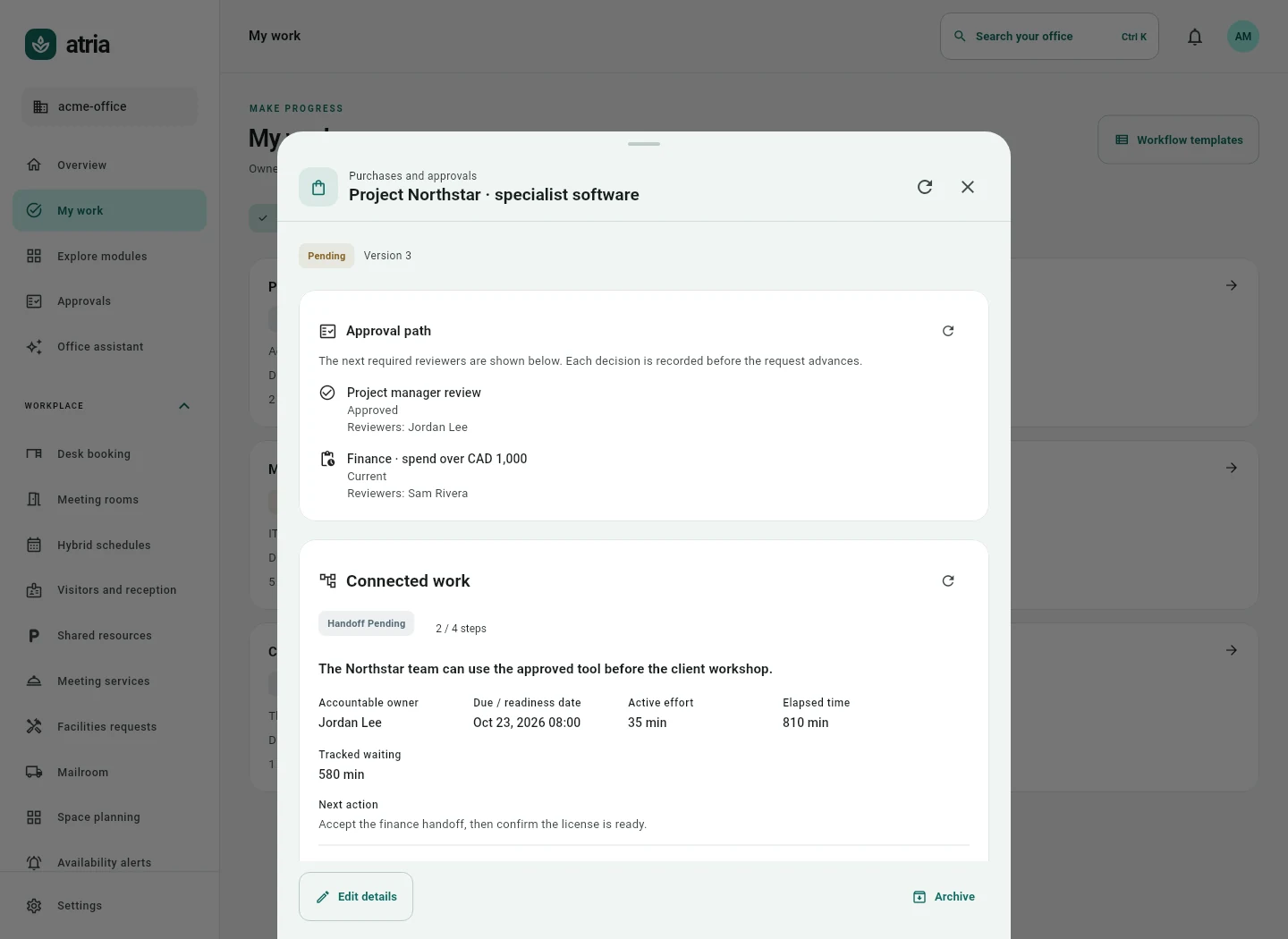
The transition coordinator creates owned tasks for the people involved. A software request captures the required application and access level, resolves missing information and follows the configured review path. After approval, an authorized operator records the real provisioning outcome. The employee verifies that access works. The shared case shows blockers and an accepted handoff, while the HR and identity systems retain their agreed authority.
Ask with the right context
Capture the employee need, owner, required system and deadline. Route clarification to a named person instead of restarting the request.
Review and accept the handoff
Use the configured manager or service owner path on approval capable records. The receiving operator accepts responsibility for the next stage.
Verify the outcome
Record external fulfillment evidence and let the employee confirm the result. Failed or uncertain actions remain visible for follow up.
Make the next action clear.
Keep the outcome verifiable.
Test the process
your people will use.
A feature list starts the conversation. A focused pilot checks the actual roles, accounts, exceptions and result.
An employee onboarding checklist that connects HR, IT and workplace teams- Employees and operators see only records their roles permit.
- A material approved request change cannot bypass another required decision.
- Approval does not mark access provisioned or a transition complete.
- The receiving team accepts the handoff and the employee can verify the outcome.
Clear scope.
A useful next step.
Which employee services are included?
The native modules cover an employee service desk, joiner or mover or leaver coordination, software and access requests, private employee cases, and a people and service ownership directory. They use the shared work case foundation.
Does approving access automatically provision an account?
No. Approval records a decision. Provisioning needs a supported authorized operation or an operator action in the source system, followed by recorded evidence and verification. A provider name is not universal provisioning.
Can HR cases be private?
The private employee case module restricts handling through application roles. It is not an investigations evidence vault, configurable ethical wall, legal hold system or independent confidentiality certification. Deployment administrators need infrastructure controls too.
Can we keep BambooHR, ServiceNow or our current service desk?
Yes, if the agreed process and explicit operations fit. Atria can address the coordination gap around retained tools. The fit review records which system owns each fact and which actions are actually supported.
Is this a full ITSM replacement?
Atria supports defined employee and workplace workflows. It does not claim complete incident, problem, change, CMDB, business calendar SLA or enterprise service commitment parity with every specialist suite.
What is the best first pilot?
Choose one request that crosses departments, such as project software access for a joining employee. Name its sponsor, operator and reviewer, then agree acceptance cases and success measures before live setup.